


















AI Dashboard Studio - From Data to Decisions
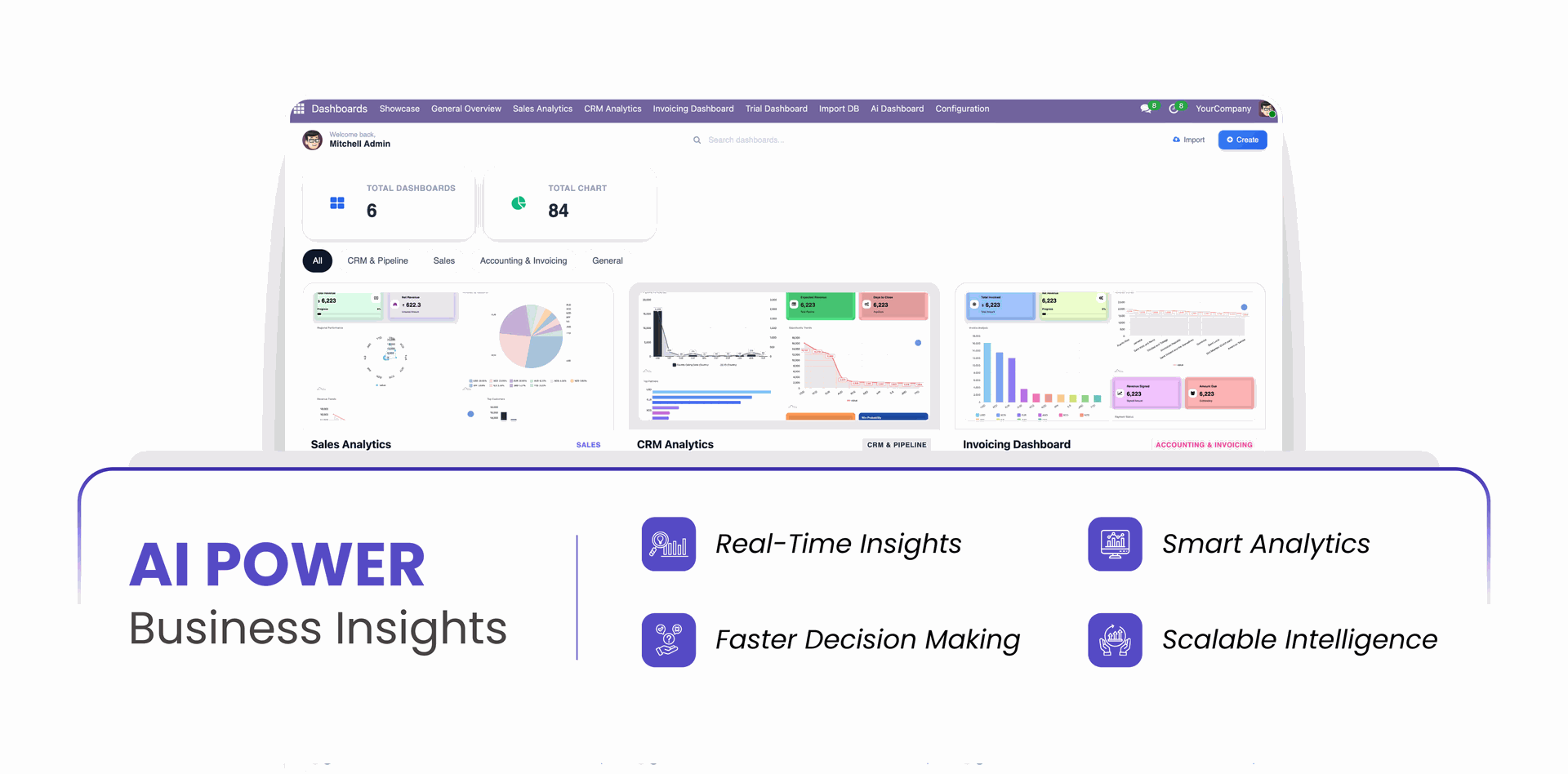
Transform your Odoo data into actionable insights with a powerful and intelligent AI-driven dashboard that brings all your analytics and visual reports into one unified interface. The AI Dashboard Generator module empowers you to build stunning, interactive, and real-time dashboards using advanced charts. This module enables users to monitor performance, analyze trends, and interact with dynamic charts using advanced visualization tools, export options, and real-time customization capabilities. Designed for flexibility and usability, the AI Dashboard provides a modern analytics experience where users can explore data visually, annotate insights, customize themes, and export reports instantly.
Key Features

AI Dashboard Builder
Create interactive Odoo AI Dashboard with charts, filters, and business insights.

Dashboard Template
Use ready-made Odoo analytics dashboard templates for faster dashboard creation.

Dashboard Creation
Build custom Odoo Intelligent Automation dashboard tailored to your business requirements.

Dashboard Categories
Organize Odoo reporting dashboard(Odoo business intelligence dashboard) into categories for better management and accessibility.

Lock/Unlock Dashboard
Lock dashboards to prevent changes and unlock when edits are needed.

Edit Dashboard
Modify Odoo chart dashboard layouts, widgets, and settings anytime.

Delete Dashboard
Remove unwanted dashboards with a simple delete option.

Export Dashboard
Export dashboard configurations for backup or sharing purposes.

Import Dashboard
Import dashboard configurations and restore dashboards instantly.

Data Filters
Apply dynamic filters to display only relevant dashboard data.

Create Charts
Generate charts from business data with a few simple clicks.

Chart Types (More Than 15)
Choose from 15+ chart types to visualize data effectively.

Theme Customization
Customize dashboard themes to match your company branding.

Edit Chart
Update chart settings, labels, and configurations whenever required.

Delete Chart
Remove charts that are no longer needed from dashboards.

Display Mode
Switch between different display modes for a better viewing experience.

Download Chart
Download charts as files for reporting and presentation purposes.

Import Chart
Import existing chart configurations into your dashboards.

Export Chart
Export chart settings for backup and easy reuse.

Print Chart
Print charts directly for meetings, reports, and documentation.

Multi Company
Manage and view dashboard data across multiple companies.

Current User Filter
Automatically filter dashboard data based on the current user by Odoo process automation.

OpenRouter Integration
Connect OpenRouter to access multiple AI models through a single API.

Smart Access Control
Control dashboard access with role-based permissions and security.
Map Chart  LATEST
Visualize location-based data on an interactive map chart for clear geographical analysis and easy identification of regional trends.
Bullet Chart LATEST
Compare actual performance against targets and predefined ranges using a compact bullet chart for quick KPI and performance analysis.
 Setup & Configuration
 Release Notes
 Support
 FAQs
FAQs

















Chart Types














Changelog
Track every update and new feature released for this module.
Map Chart and Bullet Chart Added.
New Demo Templates Added.
Initial Release.
Frequently Asked Questions
Everything you need to know before getting started.
- Check API configuration
- Verify internet connectivity
- Ensure provider API key is valid

 Buy Once, Supported Forever



 Scan to email sales






 Your Ideas Shape Our Roadmap
 Got an Idea? We'll Build It
Trusted by Businesses Worldwide


Abdulhamid Abdulwaheed
Best module for our online store. Highly adaptable, exceptional customer service, and very advanced modules.
Factura Venta POS
They have everything you need. Technical support is excellent, responds quickly, and keeps the module updated. 100% recommended!
Mehmet Muhanna
Great company and support team. Had a problem in my local Odoo server - they solved it in 5 minutes. Highly recommend.
Billy Jeffs
Customised an Odoo app for me which works perfectly. Many requirements, got it right every time. Very confident in their ability.
HP
Consistently excellent service over years of working together. Knowledge and commitment to keeping clients informed truly sets them apart.
Michal Kolasinski
Multiple addons + two custom modules. Communication always friendly and precise. Delivered on time, worked out of the box. Highly recommended!
Modules included




Coming soon
Included free when released
Upcoming
AI CRM Assistant
Intelligent lead scoring, follow-up suggestions, and pipeline insights - AI that helps your sales team close deals faster.

Upcoming
AI Social Media Post Generator
Automatically generate engaging social media posts with AI based on your business content - helping you create platform-ready posts in seconds.

Multi-Language
8 built-in translations







You May Also Like
Discover more Softhealer modules that integrate seamlessly with your Odoo environment.

AI Insight Assistant
Just ask in natural language and instantly get data, charts, tables, dashboards, and insights - all powered by intelligent automation.
View Module

AI Live Chatbot
AI-powered website live chatbot for Odoo offers 24/7 automated support using your Odoo data, documents, and knowledge base.
View Module

AI Dashboard Studio
A powerful and intelligent AI-driven dashboard that brings all your analytics and visual reports into one unified interface.
View Module

AI Insight Assistant
Just ask in natural language and instantly get data, charts, tables, dashboards, and insights - all powered by intelligent automation.
View Module


Most Demanded Apps
The Softhealer modules our customers reach for most - trusted across 100+ countries.

Activities Management
Manage, schedule, and automate Odoo activities across all departments from one view.
View Module

Access Management
Granular access control over menus, fields, buttons, and records for every user role.
View Module

Backdate Advanced
Backdate any transaction across invoices, journals, pickings, and more with full audit.
View Module

All-in-One Helpdesk
Full-featured customer support with tickets, SLA, and customer portal built for Odoo.
View Module

All-in-One Mobile Backend
Access your full Odoo backend from any mobile device with an optimised interface.
View Module

All-in-One Import
Import data from Excel or CSV files into any Odoo model with smart field mapping.
View Module
Our Services
End-to-end Odoo expertise - from setup to scale.

AI & Business Integration

Odoo Implementation

Odoo Customization

Support & Maintenance

Mobile Apps

Migration Service

Third-Party Integration

Odoo Training
Ready to connect your AI to Odoo?
Join 10,000+ businesses - Softhealer, 11+ years of Odoo expertise across 100+ countries.

